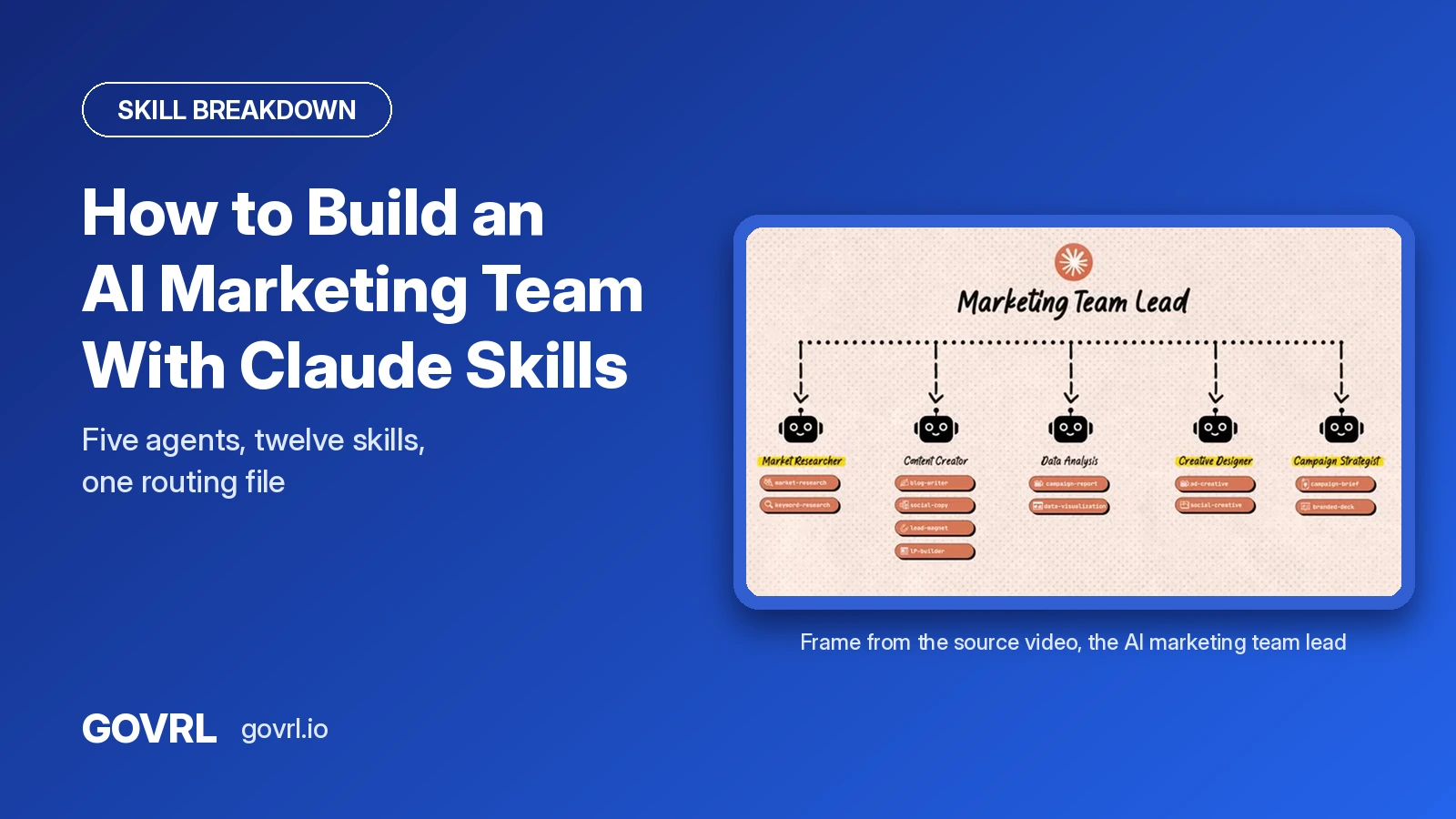
Short answer: You build it in four steps: list the marketing tasks you do every week, turn each repetitive task into a skill, group related skills into a few agents with clear roles, then write routing rules so Claude knows when to call an agent and when a skill is enough. Grace Leung shows the full build in Claude Code with 5 agents and 12 skills for a demo travel brand. The setup is free to copy. The quality depends on the brand files and templates you feed it.
Why is this video worth studying?
The video is Claude Code: Build Your Full AI Marketing Team (Agents + Claude Skills) by Grace Leung, published March 28, 2026. When we checked on October 29, 2026, it had 365,020 views on a channel with about 148,000 subscribers.
The raw count is not the point. The comparison is. Her last 30 uploads have a median of about 57,500 views, and this is the most viewed of all 30, at roughly 6 times her usual result. Her earlier take on the same idea, Claude Skills: Build Your First AI Marketing Team in 16 Minutes, sits at 200,407 views. Two videos on one topic, both far above her median. That is a strong sign marketers want this exact answer.
One disclosure: the video is sponsored by HubSpot, which she mentions on screen. The setup itself does not depend on HubSpot.
If you want to run the same check in your own niche, read how to find outlier videos in your niche.
Use it now: Find the outlier videos in your niche
What does an AI marketing team actually do?
She frames it as one team covering four jobs: research, writing, design and analysis, all working together.
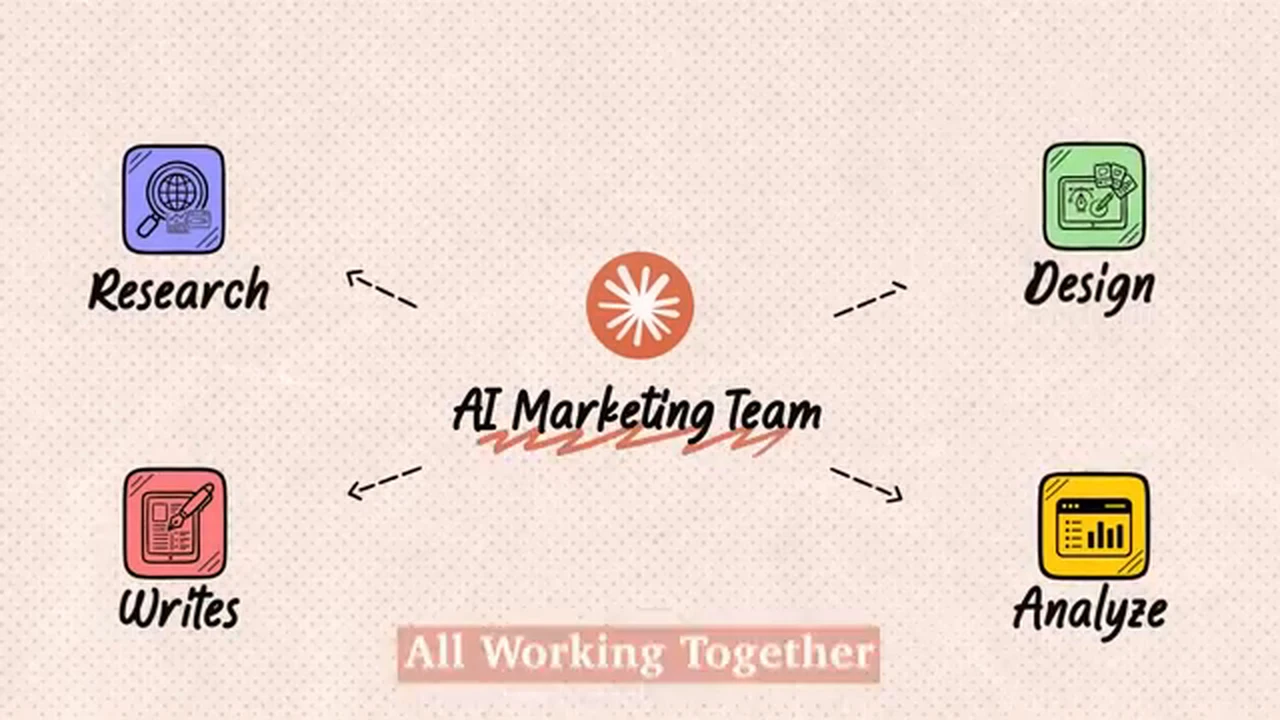
The four jobs of the AI marketing team in her framing: Research, Writes, Design and Analyze, all working together. Source: Grace Leung video, frame at 0:12
For the demo she builds the team for a travel brand called GoTravel: "Five agents, twelve skills, and we're using Claude Code to build the whole thing." She adds that it "might look different for your brand depending on your marketing focus, but the same concept applies."
What are the four steps to design the team?
Her plan, in her order:
- Map your marketing tasks. Write down what you actually do every week.
- Create marketing skills. One skill per repeated workflow.
- Define agent roles. Group similar skills into a few focused agents.
- Connect the team. Set up the project so Claude knows who it is and when to use agents versus skills.
"Turn each repetitive task into a skill. Ideally, one skill per workflow."
Source: Grace Leung, video at 0:32
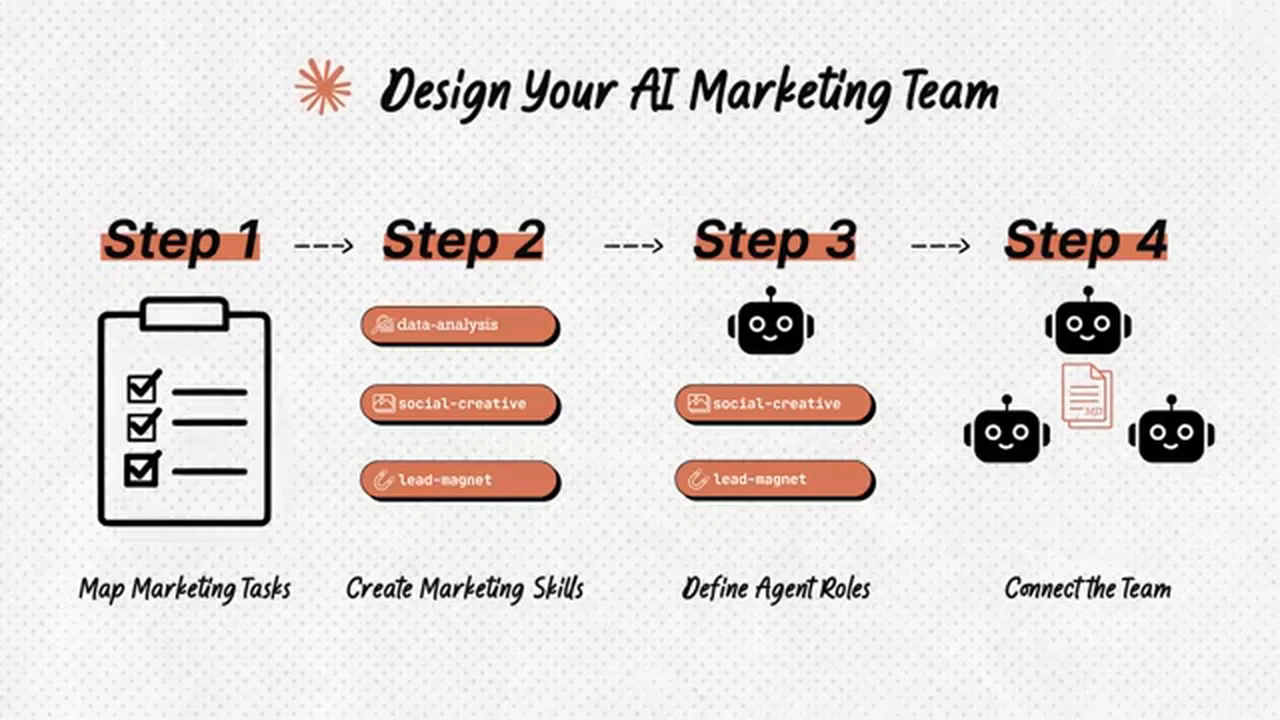
Her four-step plan: map marketing tasks, create marketing skills, define agent roles, connect the team. Source: Grace Leung video, frame at 0:52
Step 1 is where most people go wrong. If you map tasks from memory, you automate the wrong work. Map them from what is performing in your niche right now. That is the research job GOVRL is built for.
How do you set up the project in Claude Code?
She uses VS Code so you can see files and folders side by side. The setup, in order:
- Install VS Code and the Claude Code extension (the official one by Anthropic), then log in with your Claude plan.
- Create two kinds of folders. System folders (context, SOP, templates) hold reusable material for the agents. Working folders (ads, pages, presentations) are where finished work lands.
- Load your context first. Brand voice guide, style guide, product offerings, marketing strategy. She says this "will make the whole difference."
- Initialize the project by letting Claude scan the folder and write a CLAUDE.md file, the custom instructions for the whole project. She stresses that you "keep updating this file, so it is not like a one-off process."
- Install Anthropic's official skills with the /plugin command: add the official skills marketplace from GitHub, then install the document skills.
If your brand voice guide is thin, fix that before anything else. Our AI brand voice checklist is a quick way to write rules an AI can follow.
How do you build your first marketing skill?
Her first skill is a branded deck skill, built with what she calls the reference-based method:
"You give Claude examples or templates of what good looks like, and study the patterns."
Source: Grace Leung, video at 3:47
You need two inputs: your branded deck template, and a detailed analysis of how that template works, which Claude writes for you. Then Claude extends the official PowerPoint skill into a new branded deck skill with its own assets and references.
Her test: a campaign strategy deck for a summer campaign. The skill returned 13 slides in the brand template. Her own verdict is honest: some slides still needed fixes to margins and charts, but "it is 90% done."
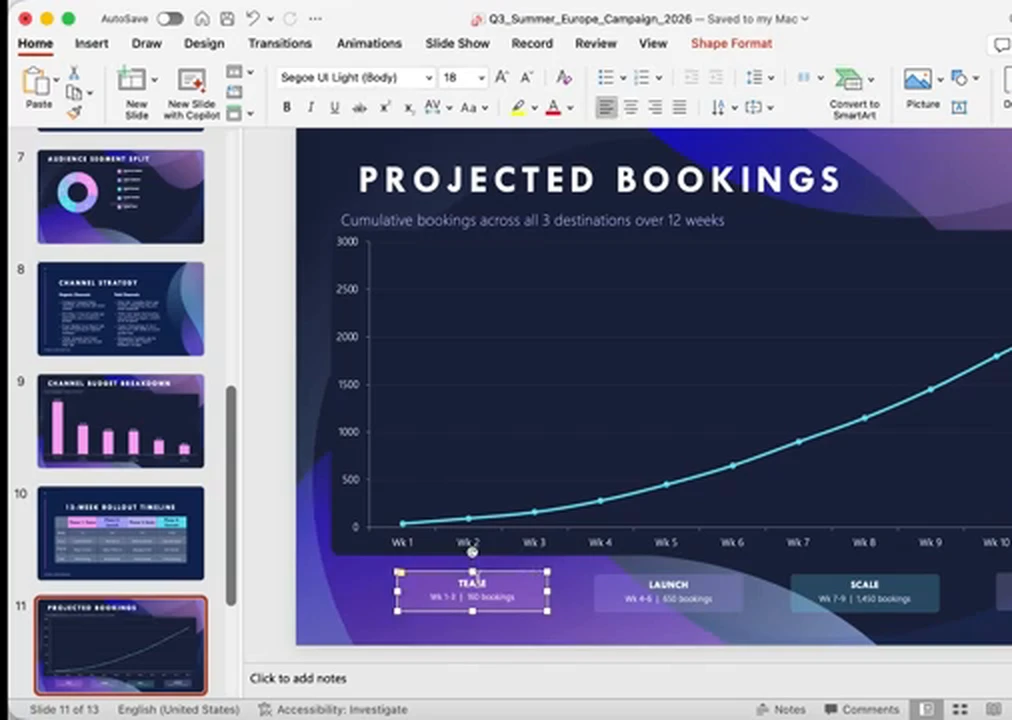
Output of the branded deck skill: a "Projected Bookings" slide from the 13-slide summer campaign deck, in the brand template (demo data). Source: Grace Leung video, frame at 5:12
The same method works for any repeated document: a strategy deck, a client report, a product launch deck.
How do you add skills that use outside tools?
Her second skill, a social creative designer, generates images through an outside tool. The steps:
- Build a style library. Put branded templates in a templates/social-creatives folder, plus a style guide that says when to use each style. They are "visual inspiration for Claude and not the exact copy."
- Connect the image model. She uses the Nano Banana model through an MCP server. In VS Code, she found the most reliable way is a .mcp.json file in the project root with the server and a Gemini API key, then checks it with the /mcp command.
- Create the skill and let Claude scan the style library.
The result was a five-slide Instagram carousel that followed one of the library styles, "not just copying the design, but just the vibe."
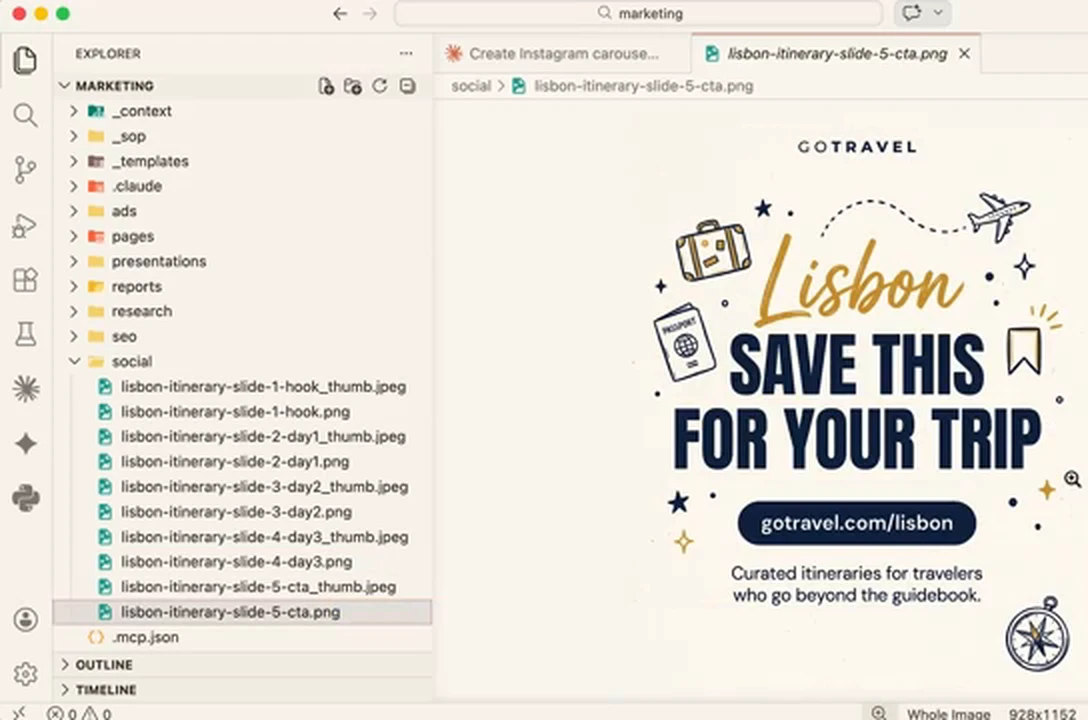
Output of the social creative designer skill: the last slide of a five-slide Lisbon carousel, with the slide files saved in the social working folder. Source: Grace Leung video, frame at 8:02
With the same methods she ends up with 12 skills in the library, from market research and keyword research to blog writer, lead magnet, landing page builder and branded deck.
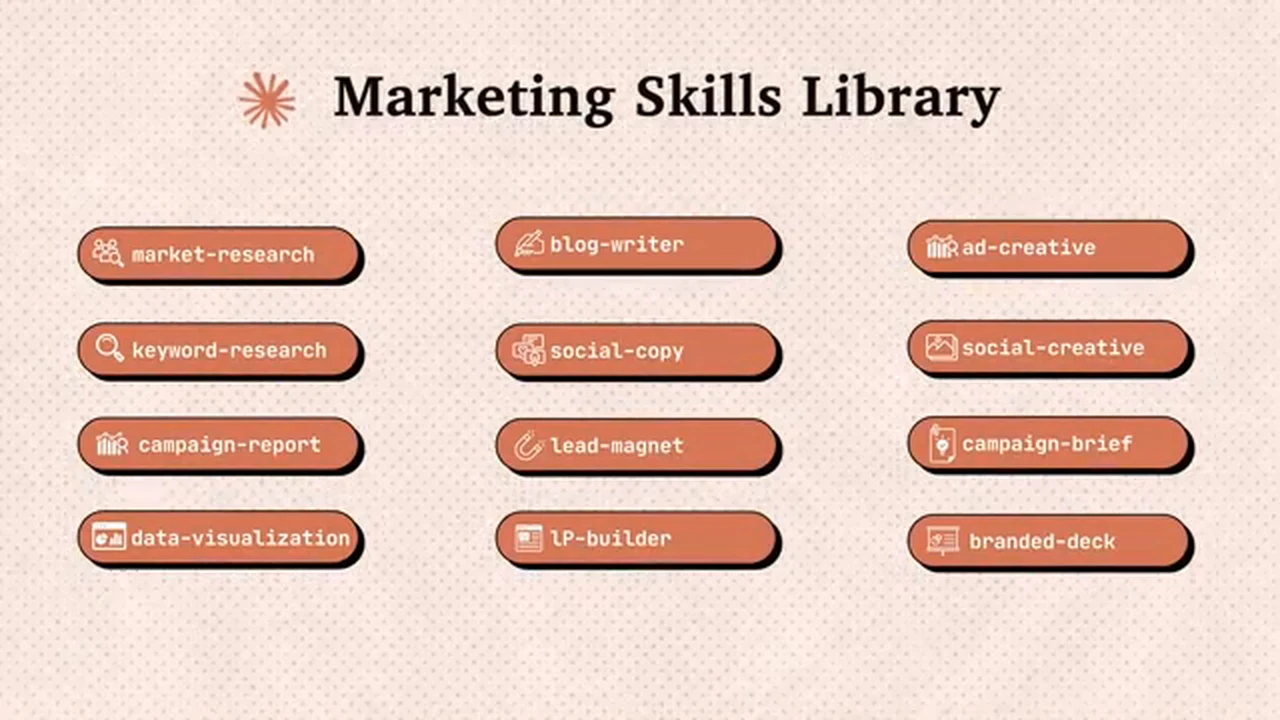
Her marketing skills library: 12 skills including market-research, keyword-research, blog-writer, social-copy, lead-magnet, ad-creative, campaign-brief and branded-deck. Source: Grace Leung video, frame at 8:08
Use it now: Save the posts you want your skills to learn from in your swipe file
When do you need agents instead of more skills?
Once you have a dozen skills, one conversation starts to struggle:
"The more skills you pipe into one conversation, the less focus."
Source: Grace Leung, video at 8:08
Her fix is sub-agents. Agents are specialist team members with their own role and tools. Skills are the shared playbook any agent can use.
- Data analyst. Created with the /agents command, scoped to this project only. Claude writes the agent file with its role, skills and core responsibility. Given a campaign dataset with eight data sets, it produced a campaign report and an interactive performance dashboard.
- Content creator. Equipped with four content skills. Asked for a campaign blog post linked to a lead magnet, it wrote the post with a table of contents and structure aimed at AI search, plus an 11-page PDF guide in the brand colors.
- Three more: a market researcher, a creative designer and a campaign strategist, each with skills from the library.
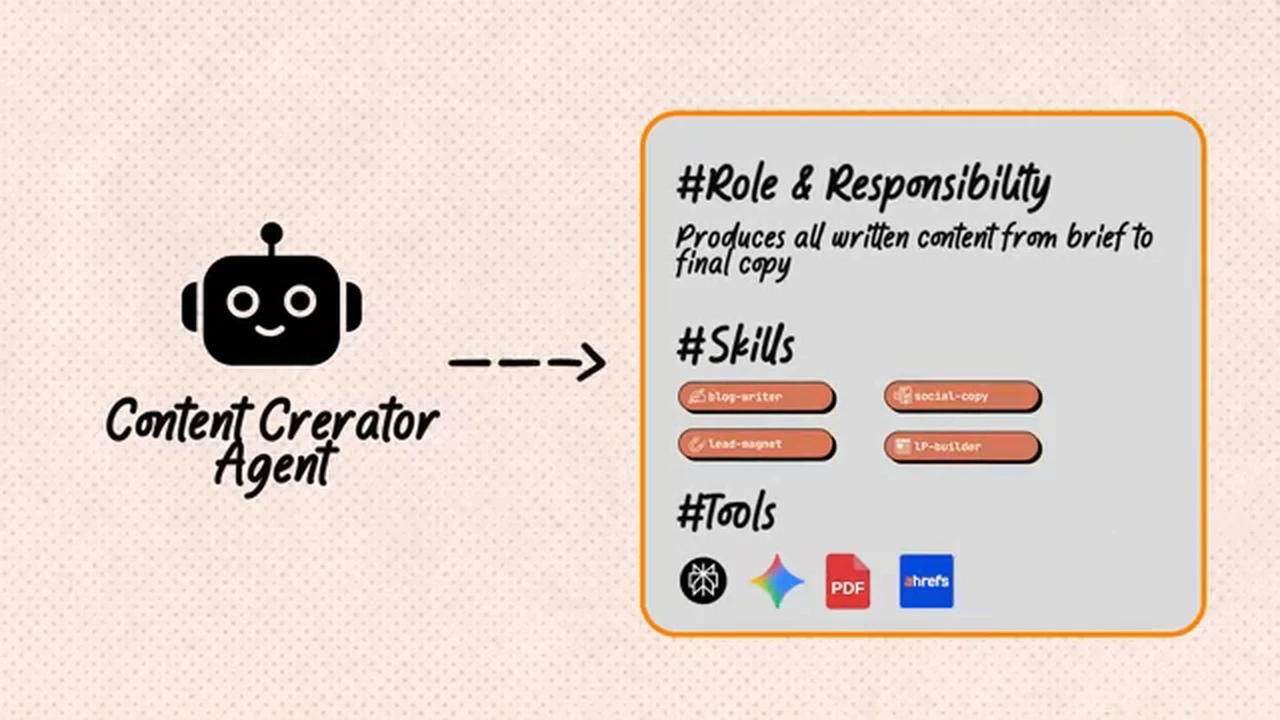
How she defines an agent: the Content Creator agent gets a role ("produces all written content from brief to final copy"), a set of skills and a set of tools. Source: Grace Leung video, frame at 8:30
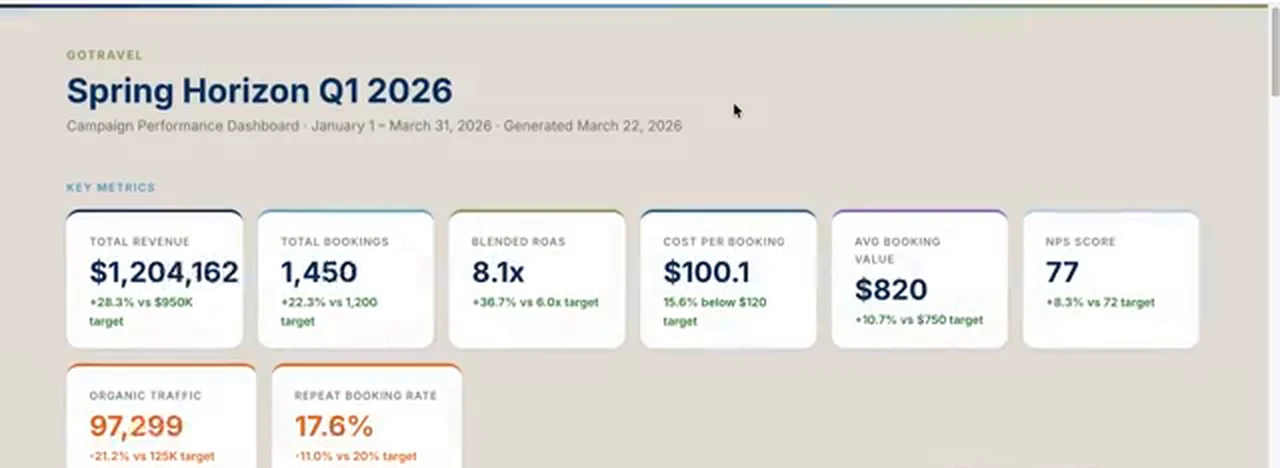
The data analyst agent's dashboard for the demo brand. These numbers come from a sample dataset, not a real campaign. Source: Grace Leung video, frame at 10:00
A note on the numbers: GoTravel is a demo brand. The dashboard shows what the agent can build, not real results.
How do the agents work together on one campaign?
Before running the team, she updates CLAUDE.md with agent routing rules, so Claude knows exactly when to hand work to which agent. She says this "will make your system much more reliable."
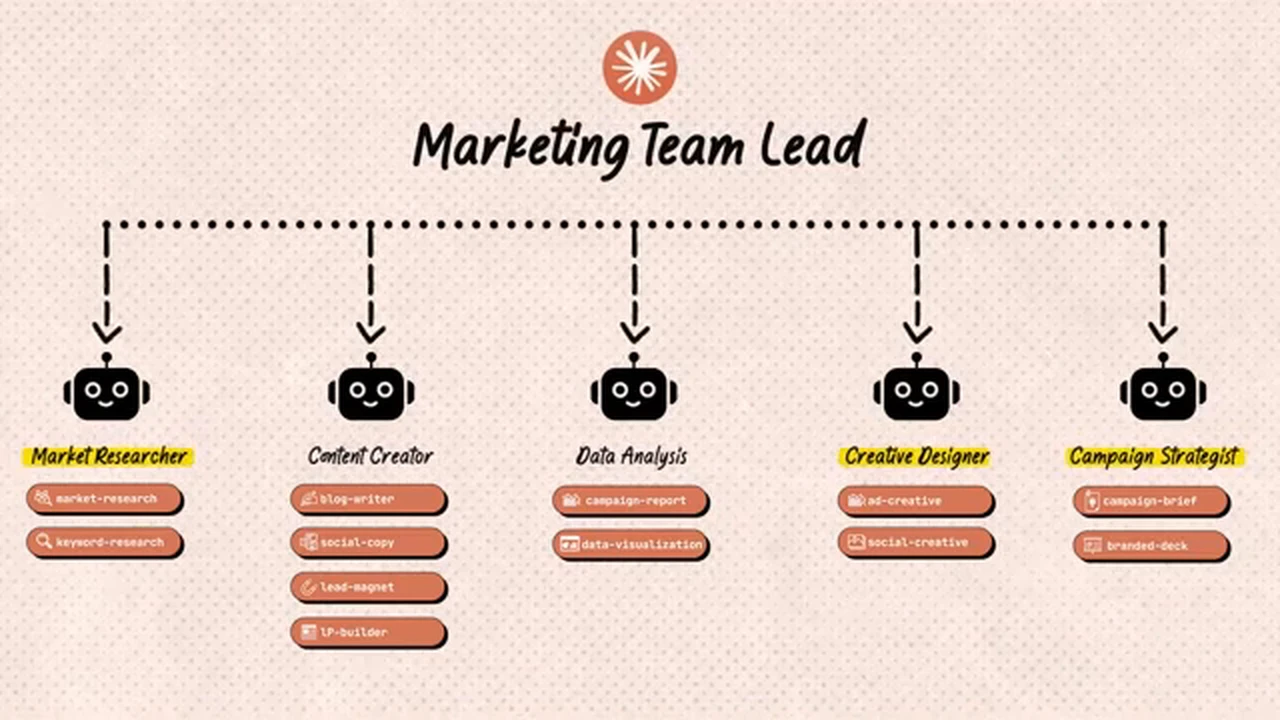
The team lead view: Claude routes work to five agents, Market Researcher, Content Creator, Data Analyst, Creative Designer and Campaign Strategist, each with its own skills. Source: Grace Leung video, frame at 11:52
Then she gives it a big task: a cherry blossom season campaign for Japan, with market research, a campaign brief, social posts, an offer landing page and ad creatives. Because of the routing rules, Claude decides step by step whether it needs an agent or just a skill:
"But for content creation that is really executional and straightforward, skill should be enough."
Source: Grace Leung, video at 12:40
She says the full package was ready after about 10 minutes, with every piece tied back to the same campaign theme.
Can your human team hand tasks to the AI team?
Yes, through a shared board. She sets up a simple Notion Kanban board where anyone on the team can drop a task with a priority and details. Then she prompts Claude to scan the pending tasks, assign an agent, and execute them by priority.
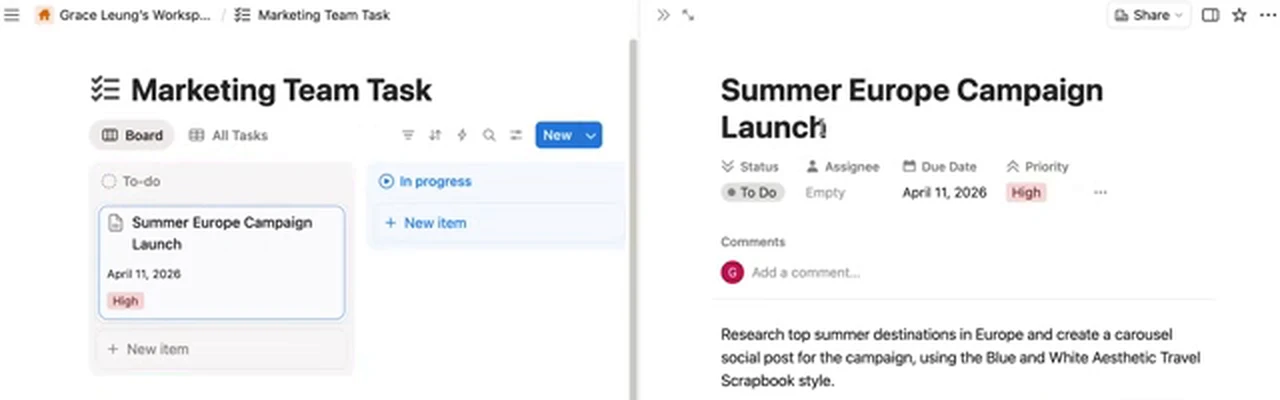
The shared Notion task board: a teammate drops "Summer Europe Campaign Launch" with a brief, and the AI team picks it up. Source: Grace Leung video, frame at 14:16
In the demo it picked up the Europe campaign task, ran the research, designed a seven-slide carousel informed by that research, and moved the task to complete with the output file paths.
She also shows remote control from the Claude mobile app: type /remote-control, open the link on your phone, and send tasks to your local session. Her warning is worth repeating:
"Don't share this link to anyone since it will give the full control of your session."
Source: Grace Leung, video at 15:45
The limit she names: it runs on one connected session, so when the context fills up you have to clear it and start again.
Where does GOVRL fit in this setup?
Her system answers "how do I produce marketing work faster". It does not answer "what should we make". Step 1, mapping your tasks, and the market researcher agent both depend on knowing what is working in your niche right now.
A simple chain:
- Research in GOVRL. Search your niche, sort by outlier score and filter by channel size, so you see posts that beat their own channel, not just big accounts.
- Read the pattern. Use channel analysis to see which content buckets keep winning for a competitor.
- Feed the team. Save the winners in your swipe file and put your notes in the context folder, so the skills and agents work from proof instead of guesses.
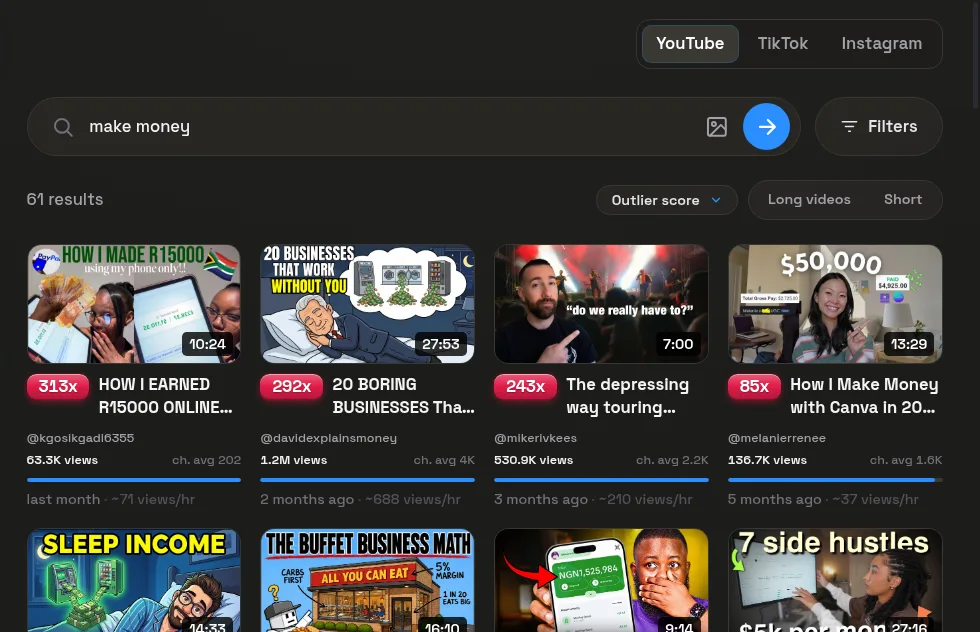
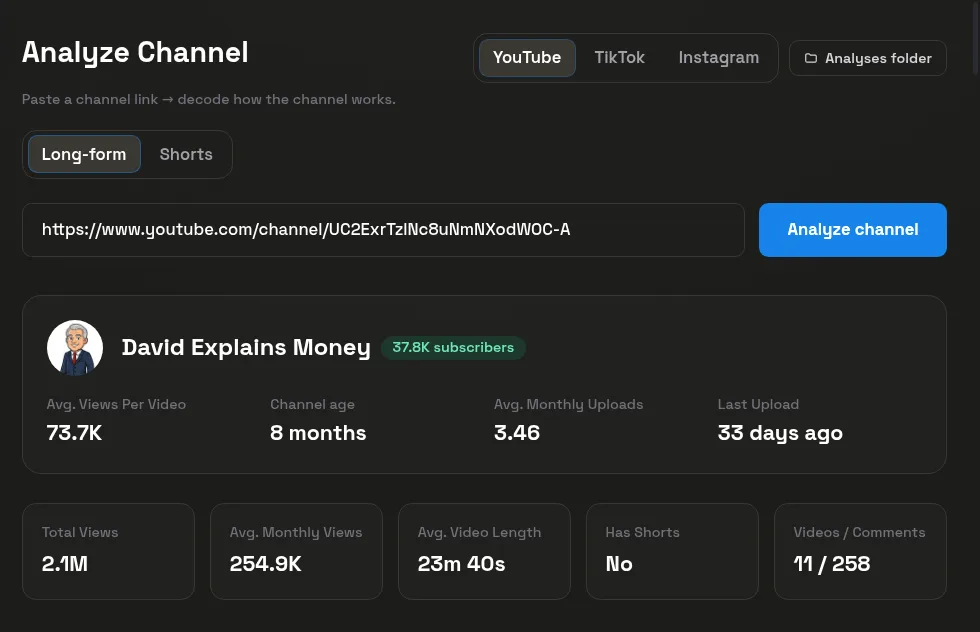
See govrl plans if you want the research step in one place.
A 30-day plan to build your own AI marketing team
- Week 1: Map and load. List your weekly marketing tasks, pull outliers in your niche into a swipe file, and write your brand voice and style guides into the context folder.
- Week 2: Build three skills. Start with the tasks you repeat most, for example a branded deck, a social carousel and a blog post. Use the reference-based method for each.
- Week 3: Add two agents. A content creator and a researcher are enough to start. Write routing rules in CLAUDE.md.
- Week 4: Run one real campaign and measure. Log time saved and results against your last manual campaign. Our AI content experiment template gives you a simple way to track it. To stretch one idea across many posts, see the Hormozi content model for small creators.
What is the real lesson from this setup?
The tools are the easy part. What makes the outputs good is the material behind them: brand guides, templates, a style library and routing rules that you keep updating. Even in the demo, the first deck was "90% done", not finished. Keep a human review at the end, start from real performance data, and add agents only when one conversation starts losing focus.